
Zarf: Air-Gapped Deployments

Deploy applications in an air-gapped environment, or just archive applications along with all of their needed resources using Zarf.
Since Zarf already has a tutorial on deploying an application using Helm charts, I thought I'd do one using regular manifests. For this example, I'll walk through creating a Zarf package of a Homepage application that you can configure as a landing page for your cluster.
In this tutorial I am going to use an image volume, so check support for before getting started. I'm going to use k3d and specify a newer version of k3s than it wants to install by default on my machine.
$ brew install k3d
$ k3d cluster create --image rancher/k3s:v1.36.4-k3s1
Install Zarf.
$ brew install defenseunicorns/tap/zarfZarf init to install on your cluster.
$ zarf initCreate a project directory and create a package definition.
$ mkdir zarfhomepage
$ cd zarfhomepage
$ touch zarf.yaml
# zarf.yaml
kind: ZarfPackageConfig
metadata:
name: homepage
version: 2.2.0
description: "A custom homepage to list services and widgets"On the gethomepage.dev site they have a nice list of all the Kubernetes resources needed to deploy a homepage here. I'm going to copy those resource definitions into files and place them in a resourceDefinitions folder.
zarfhomepage/
├── resourceDefinitions/
| ├── clusterrole.yaml
| ├── configmap.yaml
| ├── deployment.yaml
| ├── secret.yaml
| ├── service.yaml
| └── serviceaccount.yaml
└── zarf.yaml
Before moving on I want to make a few changes to some of the files here. The configMap and deployment will fail without a proxmox.yaml reference, so that needs to be fixed. Since we are versioning our package, I'm going to change the image reference from latest to "v2.2.0".
# configmap.yaml
apiVersion: v1
kind: ConfigMap
metadata:
name: homepage
namespace: default
labels:
app.kubernetes.io/name: homepage
data:
<...>
docker.yaml: ""
proxmox.yaml: ""# deployment.yaml
apiVersion: apps/v1
kind: Deployment
metadata:
name: homepage
namespace: default
labels:
app.kubernetes.io/name: homepage
spec:
replicas: 1
selector:
matchLabels:
app.kubernetes.io/name: homepage
template:
metadata:
labels:
app.kubernetes.io/name: homepage
spec:
serviceAccountName: homepage
automountServiceAccountToken: true
dnsPolicy: ClusterFirst
enableServiceLinks: true
containers:
- name: homepage
image: "ghcr.io/gethomepage/homepage:v2.2.0"
<...>
volumeMounts:
<...>
- mountPath: /app/config/proxmox.yaml
name: homepage-config
subPath: proxmox.yaml
<...>
- mountPath: /app/config/logs
name: logs
volumes:
- name: homepage-config
configMap:
name: homepage
- name: logs
emptyDir: {}Back in the package definition, we need to declare all of these as components.
# zarf.yaml
kind: ZarfPackageConfig
metadata:
  name: homepage
  version: 2.2.0
  description: "A custom homepage to list services and widgets"
components:
- name: service-account
required: true
manifests:
- name: service-account
files:
- resourceDefinitions/serviceaccount.yaml
- name: configuration
required: true
manifests:
- name: cm-and-secrets
files:
- resourceDefinitions/secret.yaml
- resourceDefinitions/configmap.yaml
- name: roles
required: true
manifests:
- name: clusterrole-and-binding
files:
- resourceDefinitions/clusterrole.yaml
- name: services
required: true
manifests:
- name: services
files:
- resourceDefinitions/service.yaml
- connect-services.yaml
- name: deployment
required: true
manifests:
- name: deployment
files:
- resourceDefinitions/deployment.yamlVariables
You may have notice on those manifests that they all have a hard-coded namespace of "default". I'd like to be able to override that. One solution we can use to help are variables.
Create a variable section at the top of Zarf.yaml and create a NAMESPACE variable. Variables must be all upper-case and can include numbers and underscores only. After a variable is defined, it can be referred to with ###ZARF_VAR_<name>###
kind: ZarfPackageConfig
metadata:
  name: homepage
  version: 2.2.0
  description: "A custom homepage to list services and widgets"
variables:
  - name: NAMESPACE
    description: "The namespace to deploy resources to"
    default: "homepage-ns"
Now in all of the resources, change any namespace values to:
namespace: ###ZARF_VAR_NAMESPACE###Test the manifest output.
$ zarf dev inspect manifests --deploy-set-variables NAMESPACE=testImage Bundling
For Zarf to be able to package our application, we need to identify all of our images in the package configuration. The Zarf cli includes helper command to find image dependencies.
$ zarf dev find-images

components:
  - name: deployment
    images:
      - ghcr.io/gethomepage/homepage:v2.2.0
Use the results of this command to edit your components. Zarf found that the development component uses the "ghcr.io/gethomepage/homepage:v2.2.0" image. We need to edit this inside of zarf.yaml
# zarf.yaml
<...>
- name: deployment
    required: true
    manifests:
      - name: deployment
        files:
          - resourceDefinitions/deployment.yaml
    images:
      - ghcr.io/gethomepage/homepage:v2.2.0
Deploy
Create the package
$ zarf package create .Now I've got all of the assets I need to deploy my application inside of "zarf-package-homepage-arm64-2.2.0.tar.zst".
I can deploy this package with:
$ zarf package deploy zarf-package-homepage-2.2.0.tar.zst -cConnect Services
You can define services and annotate them to give them extra features and have them display after deployment.
Create connect-services.yaml
# connect-services.yaml
apiVersion: v1
kind: Service
metadata:
  name: homepage-connect
  namespace: ###ZARF_VAR_NAMESPACE###
  labels:
    zarf.dev/connect-name: homepage-connect
  annotations:
    zarf.dev/connect-description: "Homepage example"
spec:
  selector:
    app.kubernetes.io/name: homepage
  ports:
    - name: http
      port: 8080
      protocol: TCP
      targetPort: 3000
Include it in the Zarf package definition. I added the file to my services component.
# zarf.yaml
kind: ZarfPackageConfig
metadata:
  name: homepage
  version: 2.2.0
  description: "A custom homepage to list services and widgets"
variables:
  <...>
components:
  <...>
  - name: services
    required: true
    manifests:
      - name: services
        files:
          - resourceDefinitions/service.yaml
          - connect-services.yaml
  <...>
Homepage protects against access from non-defined hosts, so we also need to edit our deployment. Add "localhost:8080" to the HOMEPAGE_ALLOWED_HOSTS environment variable.
# deployment.yaml
apiVersion: apps/v1
kind: Deployment
metadata:
  name: homepage
  namespace: ###ZARF_VAR_NAMESPACE###
  labels:
    app.kubernetes.io/name: homepage
spec:
  <...>
  template:
    metadata:
      labels:
        app.kubernetes.io/name: homepage
    spec:
      serviceAccountName: homepage
      automountServiceAccountToken: true
      dnsPolicy: ClusterFirst
      enableServiceLinks: true
      containers:
        - name: homepage
          <...>
          env:
            - name: MY_POD_IP
              valueFrom:
                fieldRef:
                  fieldPath: status.podIP
            - name: HOMEPAGE_ALLOWED_HOSTS
              value: "$(MY_POD_IP):3000,gethomepage.dev,localhost:8080"
          <...>
Check it out. Zarf prints out a connect command for us after deployment.
$ zarf package create .
$ zarf package deploy --values zarf-config.yaml zarf-package-homepage-2.2.0.tar.zst -c
...
     Connect Command               | Description
     zarf connect homepage-connect | Homepage example

$ zarf connect homepage-connect --local-port 8080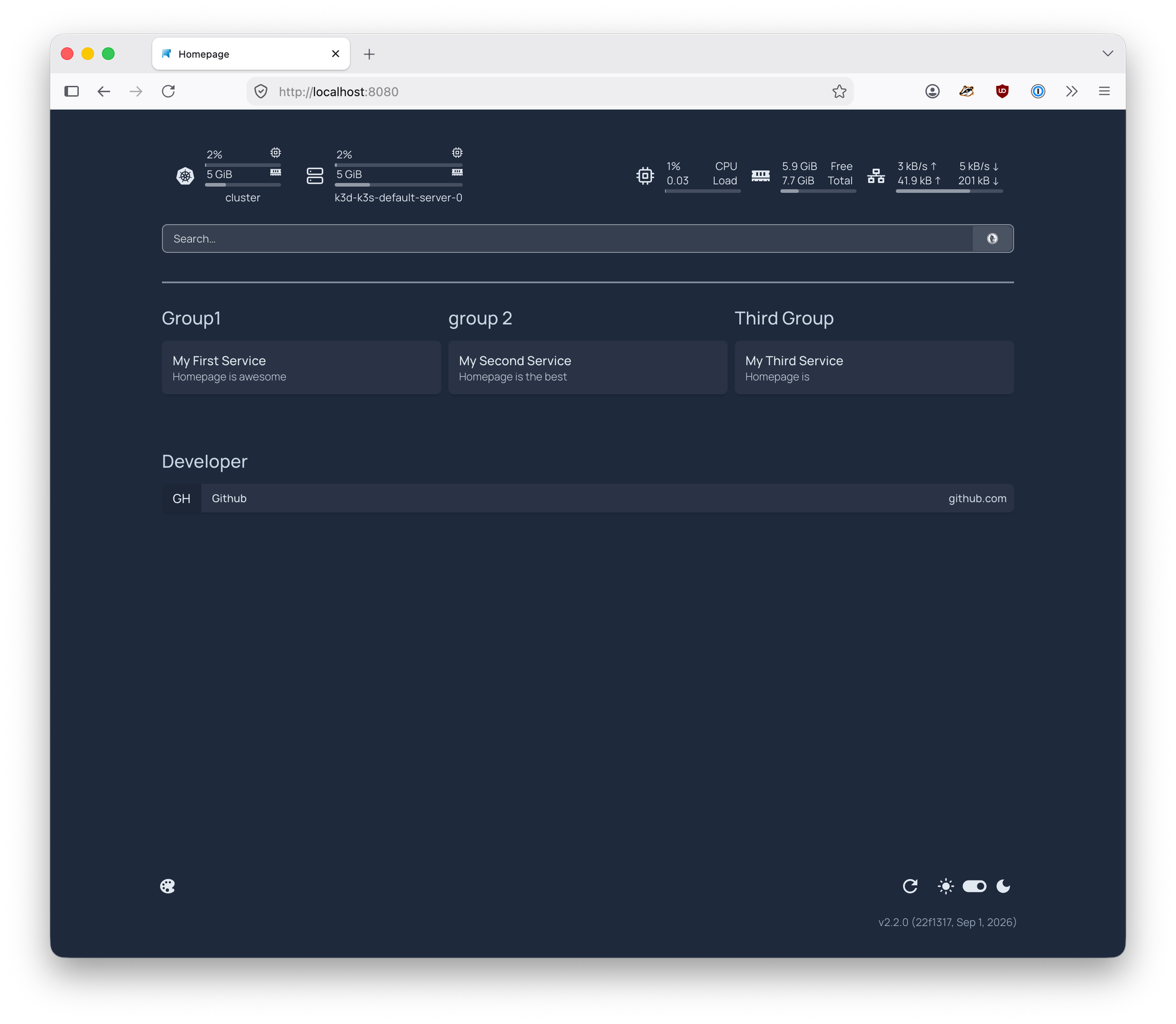
All is good. I really want to be able to change those groups without having to build a new package though...
Overrides
I'll use variables again to customize my groups, but I'm also going to set up a way to override them with an external file. This way I can start separating my customization options from my deployment a little bit.
Grab the yaml from configmap.yaml under data.services and move it to a variable in zarf.yaml as the default value. Here is my new HOMEPAGE_SERVICES variable.
# zarf.yaml
kind: ZarfPackageConfig
metadata:
  name: homepage
  version: 2.2.0
  description: "A custom homepage to list services and widgets"
variables:
  - name: NAMESPACE
    description: "The namespace to deploy resources to"
    default: "homepage-ns"
  - name: HOMEPAGE_SERVICES
    description: "Define Services and group them to display on your homepage"
    default: |
      - My First Group:
          - My First Service:
              href: http://localhost/
              description: Homepage is awesome

      - My Second Group:
          - My Second Service:
              href: http://localhost/
              description: Homepage is the best

      - My Third Group:
          - My Third Service:
              href: http://localhost/
              description: Homepage is
    autoIndent: true #This is important!
    prompt: false
Back in configmap.yaml replace data.services with our new variable.
# configmap.yaml
apiVersion: v1
kind: ConfigMap
metadata:
  name: homepage
  namespace: ###ZARF_VAR_NAMESPACE###
  labels:
    app.kubernetes.io/name: homepage
data:
  <...>
  bookmarks.yaml: |
    - Developer:
        - Github:
            - abbr: GH
              href: https://github.com/
  services.yaml: |
    ###ZARF_VAR_HOMEPAGE_SERVICES###
  <...>
If we run "zarf dev inspect manifests" the output should look unchanged.
Create a zarf-config.yaml file to put some overrides in.
package:
  deploy:
    set:
      NAMESPACE: myhomepage-ns
      HOMEPAGE_SERVICES: |
        - One:
          - First:
              href: http://localhost/
              description: Homepage is awesome
        - Two:
          - Second:
              href: http://localhost/
              description: Homepage is the best
        - Three:
          - Third:
              href: http://localhost/
              description: Homepage is changed
Test with.
$ zarf dev inspect manifests --values zarf-config.yamlCheck it in the browser.
$ zarf package create .
$ zarf package deploy --values zarf-config.yaml zarf-package-homepage-arm64-2.2.0.tar.zst -c
$ zarf connect homepage-connect --local-port 8080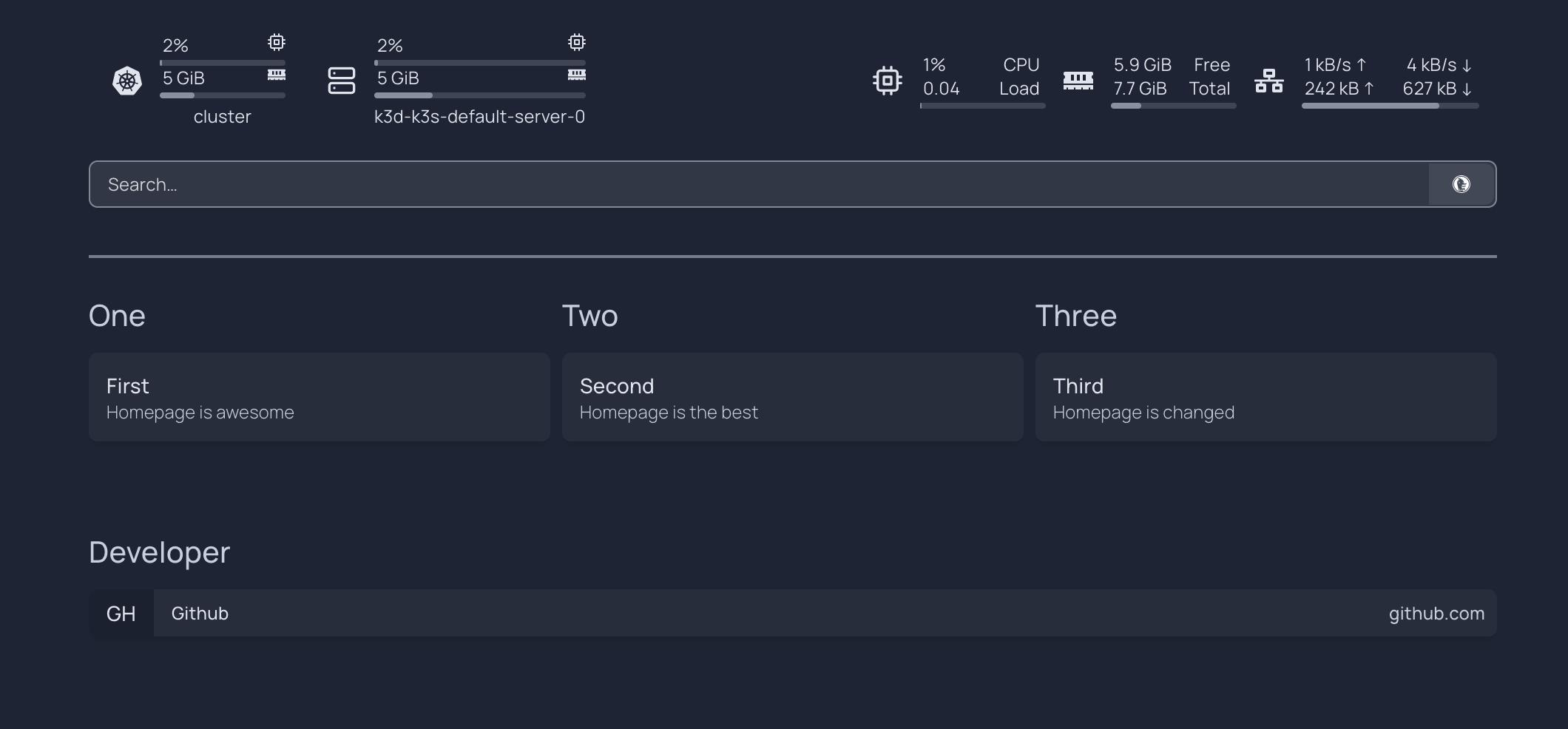
Pretty sweet. Let's go a little further and package up some more dependencies. I really want a background image, just like the sample screenshots on gethomepage.dev.
Packaging extra assets
Using Docker, I'm going to create an OCI image that holds a photo to use as a background.
Start with a directory for our image build.
$ mkdir artifactImage
$ cd artifactImage
Grab an image from unsplash.
$ curl "https://images.unsplash.com/photo-1502790671504-542ad42d5189?auto=format&fit=crop&w=2560&q=80" -o photo.jpgCreate a Dockerfile here. If you check the deployment, you'll see runAsUser/runAsGroup values, those values need to be set on the image so that the application can access our photo.
# deployment.yaml
<...>
# spec.template.spec.containers[0].securityContext
            runAsUser: 1000
            runAsGroup: 1000
# Dockerfile
FROM scratch
COPY --chown=1000:1000 photo.jpg /photo.jpgBuild the image and then go back up to the Zarf project directory.
$ docker build -t example.internal/bg-images:1.0.0 .
$ docker save example.internal/bg-images:1.0.0 -o ../bg-images.tar
$ cd ..
Update the deployment to mount the image as a volume.
# deployment.yaml
<...>
# spec.template.spec.containers[0]
          volumeMounts:
            <...>
            - name: bg-images
              mountPath: /app/public/images
      volumes:
        <...>
        - name: bg-images
          image:
            reference: "example.internal/bg-images:1.0.0"
Update the configmap to include the new background settings.
# configmap.yaml
apiVersion: v1
kind: ConfigMap
metadata:
  name: homepage
  namespace: homepage
  labels:
    app.kubernetes.io/name: homepage
data:
  <...>
  settings.yaml: |
    background:
      image: /images/photo.jpg
      blur: md
  <...>
Update the Zarf package description to include the image archive.
# zarf.yaml
<...>
  - name: deployment
    required: true
    manifests:
      - name: deployment
        files:
          - resourceDefinitions/deployment.yaml
    images:
      - ghcr.io/gethomepage/homepage:v2.2.0
    imageArchives:
      - path: bg-images.tar
        images:
          - example.internal/bg-images:1.0.0
Finally, rebuild the Zarf package.
$ zarf package create .
$ zarf package deploy zarf-package-homepage-2.2.0.tar.zst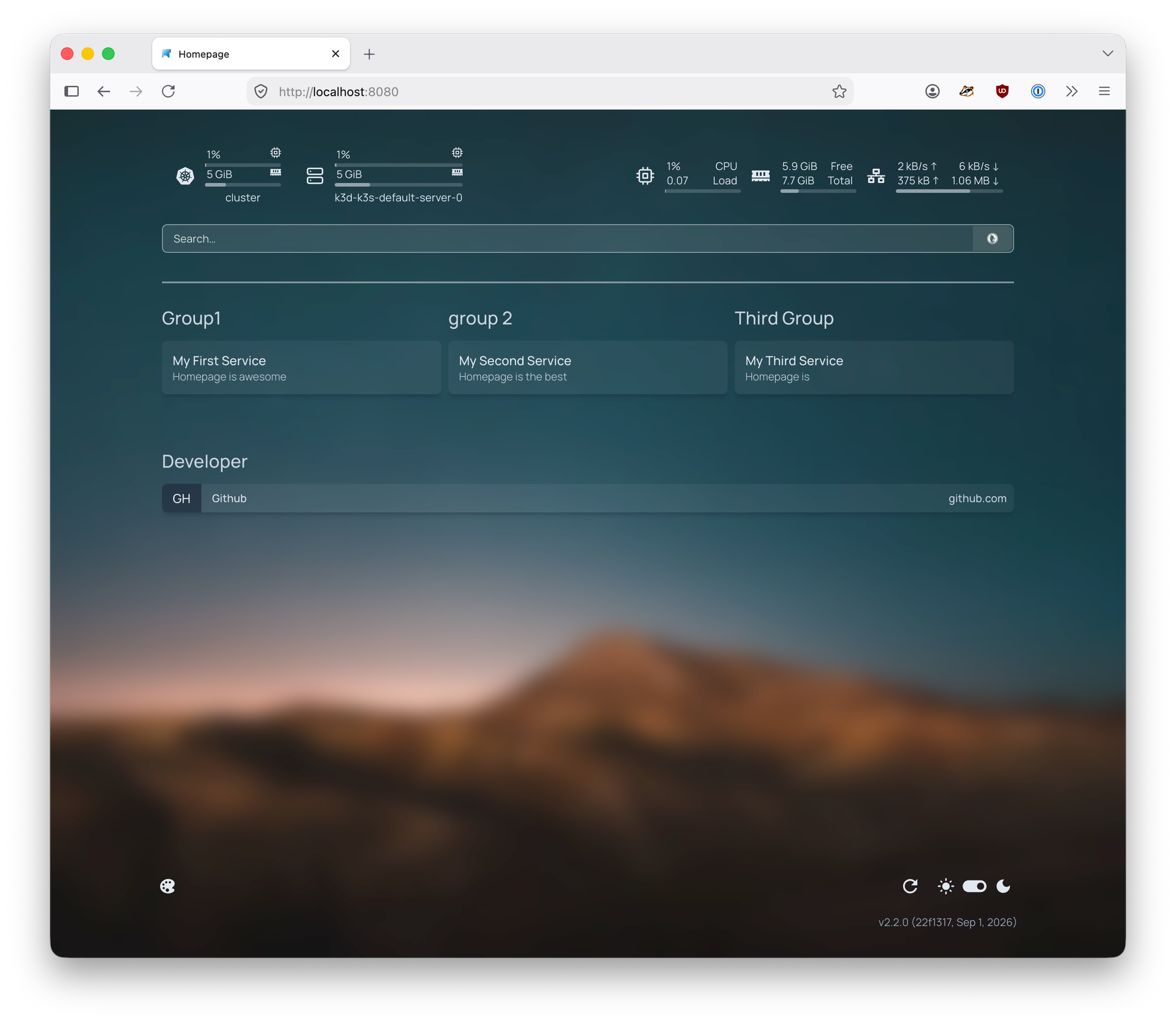
Now we have a configurable homepage package that we can take anywhere!